

Flick to type. Your typing never leaves your phone.
An Android keyboard of big hexagon keys for fewer typos, flicks that replace strings of taps, and autocorrect that runs on your phone.
Tap to type. Flick up for a capital.
Fewer typos. Fewer taps. Your typing stays on your phone.
-
Fewer typos
Seven keys across instead of ten, so each key is about 40% wider. Hexagons are rounder targets than tall rectangles, so your thumb lands where it aims.
Why hexagons -
Fewer taps
A capital is one flick, not shift then a letter. A symbol is one slide, not three taps. A word goes in one swipe, and comes back with another.
Taps saved -
Your typing stays on your phone
No account, no cloud, no analytics. Autocorrect, suggestions, pinyin and emoji all run on the phone, and nothing you type is ever sent anywhere.
How to check
Why hexagons: fewer typos by design.
- About 40% wider keys. No shift, delete or symbol keys take up the rows, so seven keys fit across instead of ten. On a phone about 70 mm wide that is roughly 9.4 mm a key instead of 7 mm, above the 7.6 mm a thumb-typing study recommends for accurate typing.
- Rounder targets. A hexagon’s edge sits at almost the same distance from its centre in every direction. A tall, narrow key’s doesn’t, so a tap that lands a little to the side slips onto the neighbour.
- Nearest centre wins. Every touch goes to the key whose centre is closest. There is no edge to miss.
- Autocorrect knows the honeycomb. It reads exactly where you touched on the hexagons, so a near miss is read as the neighbour you meant.
- No delete key to hit by accident, and every delete can be undone with a swipe to the right.
We haven’t published an accuracy study of Flikzi yet; these are the design reasons. Key-size research: Parhi, Karlson and Bederson, Target size study for one-handed thumb use (MobileHCI 2006). More on the design.
Five moves.
Fewer taps for everything.
No shift key, no delete key, no long rows of symbols. Each move replaces a string of taps, and every key does more.
-
Flick up for a capital
Any upward flick types the capital letter. Sentences start with a capital on their own, so you rarely need it.
-
Hold and slide for symbols
Each letter carries two marks in its top corners. Hold, slide left or right, let go. Keep sliding right for accents: é, ñ, ü.
-
Swipe a letter to delete a word
A quick swipe left on any letter deletes the last word. Swipe right to bring it back.
-
Swipe a space to delete a letter
Press a space key and swipe left: one letter goes. Swipe right and it comes back.
-
Keep holding to keep deleting
After the swipe, keep your finger down: letters keep going, faster the longer you hold, straight past the ends of words. Turn back half a key to undelete instead.
Taps saved
| To do this | A standard keyboard | Flikzi |
|---|---|---|
| A capital letter | Shift, then the letter: 2 taps | 1 flick up |
| A symbol such as # or % | ?123, the symbol, then ABC: 3 taps | 1 hold and slide |
| An accent such as é | A long press, then pick from a menu | 1 hold and slide, further right |
| Delete the word “tomorrow” | 8 backspace taps | 1 swipe left on any letter |
| Delete the last three words | A backspace tap per letter | 3 swipes left on any letter |
| Bring back what you deleted | Type it again | Swipe right on a space or a letter |
| Capitalise a word you already typed | Move the cursor, delete the letter, shift, retype | 1 flick up on the right space |
| Make that word UPPERCASE | Delete it, caps lock, type it again | 1 more flick up |
| Switch language | Find the globe key, tap it | 1 flick up on the left space |
“Standard” means a layout with a shift key, a backspace key and a ?123 symbols key. Some keyboards add long-press symbols or backspace swipes; on Flikzi the gestures are the whole design.
There is more: flick the left space up to switch language (hold for a picker of your languages) or down to hide the keyboard, flick the right space up for Title case then UPPER, and flick Enter down for a new line. The full rulebook.
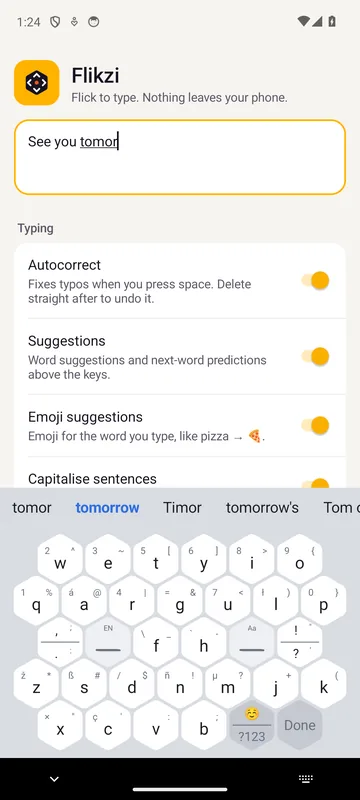
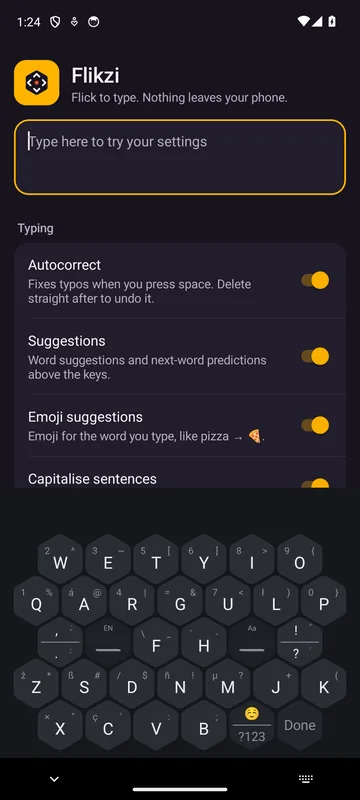
The real thing, in light and dark.
Flikzi follows your phone’s theme. Suggestions sit above the keys and predict the next word as you go, and every key shows the symbols you can slide to.
Screenshots from the Flikzi 0.4.0 test build on Android 14.
What you type stays on your phone.
Flikzi’s autocorrect, word suggestions, pinyin and emoji all run on the phone in your hand. Your typing is never sent to a server, ours or anyone else’s. Today Flikzi goes further and asks Android for no permissions at all, not even internet access. You can check:
- Open Settings, then Apps.
- Tap Flikzi, then Permissions.
- Read the list. It’s empty.
 Flikzi
App permissions
No permissions requested
What’s in the box
Everything a keyboard needs, counted. Autocorrect, suggestions and next-word predictions are in there too, all working offline.
- 0 words sent anywhere
- Everything you type stays on your phone.
- 7 keys across
- Instead of 10, so every key is about 40% wider.
- 2 space keys
- They type spaces, delete, switch language and capitalise.
- 48 symbols in the corners
- Hold a letter and slide to reach them.
- 50 accented letters
- é, ñ, ü and friends, one slide further right.
- 2 ways to delete
- Swipe a space for letters, or a letter for a whole word.
- 23 languages
- From Spanish to Japanese, and autocorrect knows them all.
- 1,898 emoji
- With skin tones and suggestions as you type.
- 1 number pad
- Between the halves on foldables and tablets.
Unfold it. It splits.
On an unfolded foldable, a tablet or a phone on its side, Flikzi splits in two so each thumb has its own half. The middle keys sit on both sides, and a number pad fills the gap.
Flikzi on foldables and tabletsWhat Flikzi doesn’t do
- No swipe typing. You tap and flick; you don’t draw words.
- No voice typing. Good voice input needs a server, and Flikzi has none.
- No cloud backup or sync. Your settings stay on the phone they’re on.
- 23 languages, not hundreds. The list; no zhuyin or handwriting yet.
- No iPhone version. Flikzi is Android only, from Android 7.0.
Questions
Is Flikzi available now?
How much will Flikzi cost?
Is Flikzi available for iPhone?
Does Flikzi send what I type anywhere?
How do I delete without a delete key?
Which languages does Flikzi support?
Be first to flick.
Flikzi is in testing on Android phones and foldables now. Join the waitlist and we’ll tell you the day it lands on Google Play.